
Monitor your Sungrow system locally. Skip the cloud.
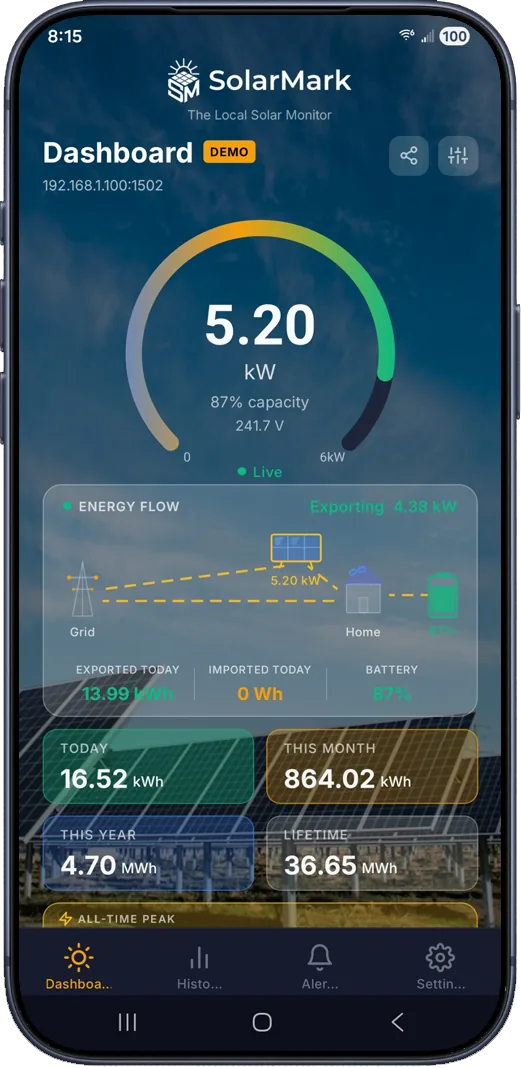
Sungrow inverters can serve live data over Modbus TCP on your home network, and hybrid models expose battery data too. SolarMark reads live power, grid flow, battery State of Charge, and energy history straight from the inverter. No cloud account, no subscription, 5-second updates while the app is open.
One-time purchase. Free 14-day trial: confirm your setup connects before you buy.
Sungrow Setup
Three steps to local monitoring
The smoothest path is a wired connection to the inverter's own LAN port. The Wi-Fi dongle can work too, but it's the less reliable route.
Connect the inverter's LAN port
On SH-series hybrid inverters, run an Ethernet cable from your router to the inverter's built-in LAN port (not the WiNet dongle). Modbus runs on port 502. Some firmware requires the LAN port to be enabled once through the iSolarCloud app's local access screen; your installer can do this in minutes if needed. If your model connects only through the WiNet-S dongle, a connection is often still possible on the same port, but reliability and available data vary by dongle firmware, so lean on the free trial to confirm.
Give the inverter a fixed address
Your inverter needs to keep the same address on your home network. Open your router or internet provider's app, find the inverter under "Connected Devices," and choose "Reserve IP" or "Fixed IP."
Add it in SolarMark
Install SolarMark, add an inverter, and choose Sungrow as the vendor type. Enter the inverter's IP address and port 502, or let the built-in network scan find it for you. Built-in diagnostics test reachability, the port, and the Modbus handshake so you can see exactly where a connection stands.
Setup steps reflect typical Sungrow configurations. Menu names can vary by model and firmware; the in-app setup guide has detailed instructions. Deciding between the dongle and the LAN port? Read the comparison.
What you get
Everything iSolarCloud shows you. Faster. Yours.
Live data every 5 seconds while the app is open, straight from the inverter, plus history, alerts, and exports that never leave your devices.
Live Power Gauge
Real-time readings every 5 seconds while the app is open, scaled to your system's rated capacity.
Grid Import / Export
Watch power flow to and from the grid in real time, with daily, monthly, and lifetime totals.
Energy History & Charts
Daily records stored locally on your device. View 30 days, 3 months, 12 months, or lifetime.
Smart Alerts
Seven configurable alerts (no generation, inverter offline, low power, battery conditions), weather-gated to avoid false alarms.
Widgets & Notifications
Android home screen widgets and a persistent live notification with current power and today's energy.
CSV Export & Backup
Export energy history for your own spreadsheets, and back up your data so a lost phone never means lost history.
Hybrid with a battery? SolarMark tracks State of Charge, charging status, temperature, and voltage alongside your solar production. See the full feature list.
FAQ
Sungrow questions, answered
Is SolarMark affiliated with Sungrow?
No. SolarMark is an independent app built by an independent developer and is not affiliated with or endorsed by Sungrow Power Supply Co., Ltd. It reads data over Modbus TCP, a standard industrial protocol Sungrow inverters support.
Which Sungrow models are compatible?
SolarMark speaks Sungrow's Modbus register map, covering SG-series string inverters and SH-series hybrids. Hybrids with a built-in LAN port are the smoothest setups. Systems that connect only through the WiNet-S dongle vary by dongle firmware, so use the free 14-day trial to confirm your specific setup connects before purchasing.
Can I see my battery data?
Yes, on hybrid systems with battery storage SolarMark tracks State of Charge, charging and discharging status, temperature, and voltage, and can export battery history to CSV. Note that dongle-only connections may expose less battery detail than the LAN port.
Will this interfere with iSolarCloud?
No. Local Modbus polling runs alongside the inverter's normal cloud reporting, so your existing iSolarCloud dashboard keeps working exactly as before. SolarMark simply gives you a direct local view with faster updates, and it keeps working when your internet is down.
What does SolarMark cost?
A one-time purchase with a free 14-day trial. No subscription, no cloud account, no recurring fees. The app talks directly to your inverter, so there's no server infrastructure for anyone to pay for.
Connection trouble? Work through the troubleshooting checklist, or email support@solarmark.us
Ready to see your Sungrow data live?
Download SolarMark, try it free for 14 days, and take back control of your solar data.
Not a Sungrow system? See the SolarEdge, SMA, and Fronius guides, or the full compatibility list.