Your installer is gone. Your inverter still works.
The last few years have been rough on solar companies. Titan Solar Power closed in 2024, SunPower filed for bankruptcy the same year and its monitoring later moved to a paid subscription, Freedom Forever followed in 2026, and SMA wound down its Australian home business. When a company disappears, its apps and portals die or start charging. The inverter on your wall doesn't care. Many inverters speak SunSpec Modbus, a manufacturer-standard local protocol that keeps working no matter who goes out of business.
One-time purchase. Free 14-day trial: confirm your setup connects before you buy.
Check your hardware
What's on your wall?
Your installer chose the inverter, and the inverter decides whether local monitoring works. Find the brand on the unit's label, then check it here. We'd rather tell you now than after you install the app.
Works with SolarMark
Not compatible (we won't pretend otherwise)
- Enphase microinverter systems. No standard local Modbus. The Enphase app itself remains free and working, so you're not stranded.
- SunPower Equinox / SolarBridge systems with a PVS gateway. That hardware speaks its own local protocol, not Modbus. Want us to support it? Email us; demand counts.
- Generac PWRcell. Its gateway blocks local connections.
- Tesla, and legacy serial-only inverters without a network port.
Not sure what you have? Email a photo of your inverter's label to support@solarmark.us and we'll tell you straight.
Getting reconnected
Three steps to take back your monitoring
If your inverter is on the compatible list above, a one-time setup gets you live data on your phone with no company in the middle.
Identify your inverter
Look at the unit mounted on your wall or next to your meter and note the brand and model on its label. If your installer's portal is still partially alive, the system details page may also list it. Then open the matching guide: SolarEdge, SMA, Fronius, or Sungrow.
Enable Modbus on the inverter
Every brand ships with Modbus switched off. Some brands let you enable it yourself through the inverter's own web interface (Fronius, often SMA); others need an installer-level login (SolarEdge SetApp). Any licensed solar electrician can do it in minutes; you don't need your original installer. The brand guides above have the exact menu paths.
Add it in SolarMark
Install SolarMark and add your inverter with the built-in network scan or its IP address. From then on, your data lives on your phone: live power, energy history, savings, and alerts. Back it up so no company, including us, can ever take it away. The free 14-day trial means you confirm everything works before paying anything.
SolarMark is a monitoring app. For warranty claims, repairs, or physical service on an orphaned system, contact a licensed local solar installer.
What you get
Monitoring that can't be orphaned
Everything runs between your phone and your inverter. There is no server to shut down, no account to migrate, and no subscription to raise prices on.
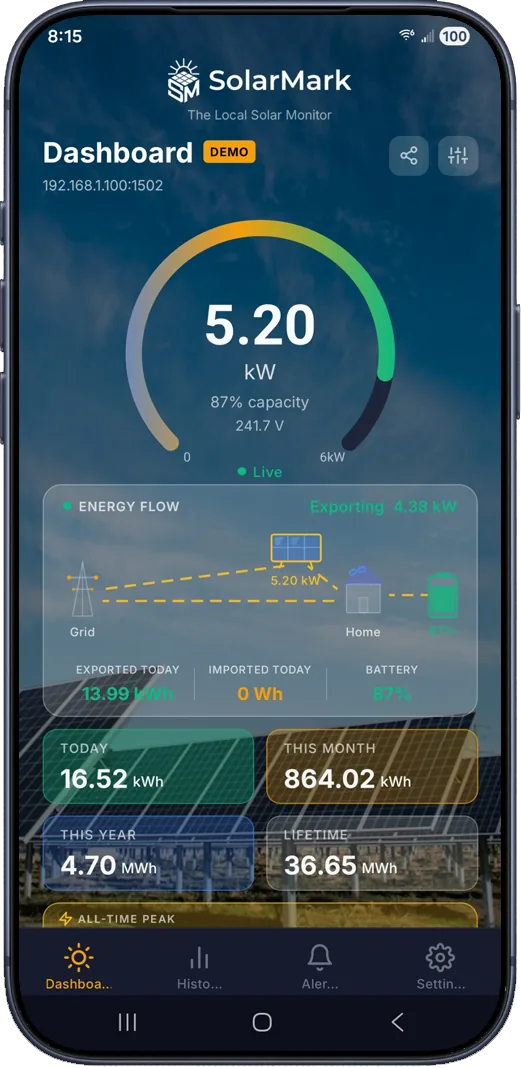
Live Power Gauge
Real-time readings every 5 seconds while the app is open, scaled to your system's rated capacity.
Grid Import / Export
Watch power flow to and from the grid in real time, with daily, monthly, and lifetime totals.
Energy History & Charts
Daily records stored locally on your device. View 30 days, 3 months, 12 months, or lifetime.
Smart Alerts
Seven configurable alerts (no generation, inverter offline, low power, battery conditions), weather-gated to avoid false alarms.
Widgets & Notifications
Android home screen widgets and a persistent live notification with current power and today's energy.
CSV Export & Backup
Export energy history for your own spreadsheets, and back up your data so a lost phone never means lost history.
One-time purchase. Your history is stored on your device and exportable to CSV whenever you want it. See the full feature list.
FAQ
Orphaned-system questions, answered
My installer owned my monitoring account. Is my data gone?
The history stored in their portal may be out of reach, but the inverter itself keeps its lifetime production totals and keeps generating live data every second. SolarMark reads those totals and builds a new day-by-day history on your phone from the moment you connect.
My installer went out of business. Who enables Modbus for me?
Any licensed solar electrician can, and for some brands you can do it yourself. Fronius and many SMA systems are owner-enableable through the device's own web interface. SolarEdge needs someone with SetApp installer access, which any SolarEdge-accredited installer has, not just your original company.
I have a SunPower system and I'm being asked to pay for monitoring. Can SolarMark replace it?
Not yet, and we won't pretend otherwise. SunPower Equinox and SolarBridge systems use a PVS gateway that speaks its own local protocol rather than standard Modbus. If you'd like us to build support for it, email support@solarmark.us; the amount of demand genuinely influences what gets built next.
I have Enphase microinverters. What are my options?
SolarMark can't connect to Enphase systems; they don't expose standard local Modbus. The good news is the Enphase app itself is free and still working, so an installer bankruptcy doesn't cut off your monitoring the way it does with installer-owned portals.
Does SolarMark handle warranties or repairs?
No. SolarMark is a local software monitoring utility only. For warranty claims, repairs, or physical service, contact a licensed solar installer in your area. What SolarMark gives you is the data: you'll know immediately if your orphaned system stops producing, which is exactly when you want to call someone.
What does SolarMark cost?
A one-time purchase with a free 14-day trial. No subscription and no cloud account, which is rather the point if you've just watched a monitoring subscription appear where a free app used to be.
Connection trouble? Work through the troubleshooting checklist, or email support@solarmark.us