
Monitor your Fronius system locally. Skip the cloud.
Fronius inverters speak SunSpec Modbus, an open local protocol, and both the GEN24 and SnapINverter generations can serve it on your home network. SolarMark reads live power, grid import/export, and energy history straight from the inverter. No cloud account, no subscription, 5-second updates while the app is open.
One-time purchase. Free 14-day trial: confirm your setup connects before you buy.
Fronius Setup
Three steps to local monitoring
Fronius ships with Modbus switched off, but unlike some brands you can usually turn it on yourself. No installer code is required.
Enable Modbus TCP on the inverter
On a GEN24 or GEN24 Plus: open the inverter's web interface, go to Communication, then Modbus, and activate "Slave as Modbus TCP". The default port is 502. For the SunSpec Model Type setting, note which option is selected ("int + SF" or "float"). On a SnapINverter (Primo, Symo, Galvo, Eco): open the Datamanager 2.0 web interface, go to Settings, then Modbus, and set "Data output via Modbus" to tcp. Most SnapINverters sold after about 2016 have the Datamanager card built in.
Give the inverter a fixed address
Your inverter needs to keep the same address on your home network. Open your router or internet provider's app, find the inverter under "Connected Devices," and choose "Reserve IP" or "Fixed IP." A wired Ethernet connection is the most reliable, but Wi-Fi works too.
Add it in SolarMark
Install SolarMark, add an inverter, and choose "SunSpec Standard" as the type. Enter the inverter's IP address and port 502, or let the built-in network scan find it for you. Built-in diagnostics test reachability, the port, and the Modbus handshake so you can see exactly where a connection stands.
Setup steps reflect typical Fronius configurations. Menu names can vary by model and firmware; the in-app setup guide has detailed instructions.
What you get
Everything the cloud portal shows you. Faster. Yours.
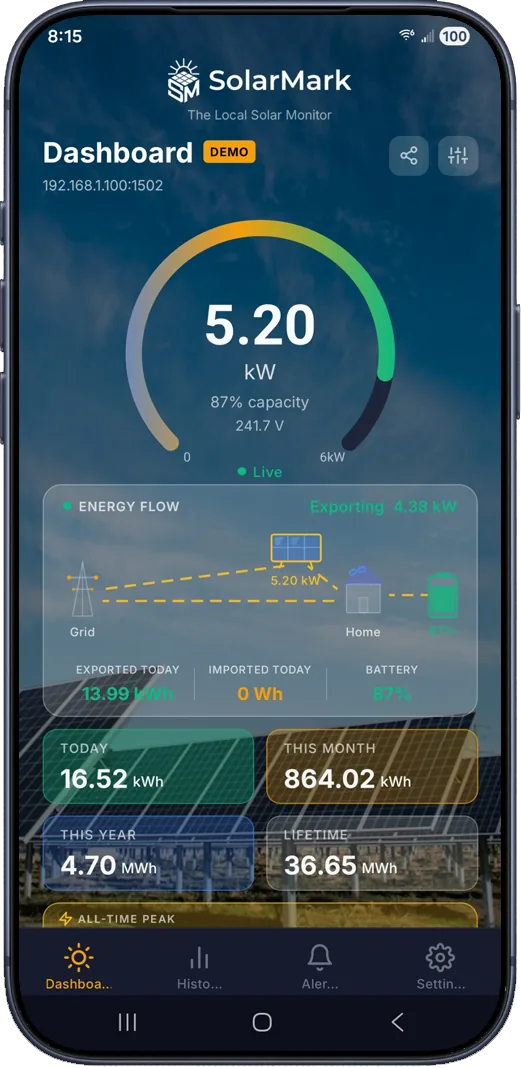
Live data every 5 seconds while the app is open, straight from the inverter, plus history, alerts, and exports that never leave your devices.
Live Power Gauge
Real-time readings every 5 seconds while the app is open, scaled to your system's rated capacity.
Grid Import / Export
Watch power flow to and from the grid in real time, with daily, monthly, and lifetime totals.
Energy History & Charts
Daily records stored locally on your device. View 30 days, 3 months, 12 months, or lifetime.
Smart Alerts
Seven configurable alerts (no generation, inverter offline, low power, battery conditions), weather-gated to avoid false alarms.
Widgets & Notifications
Android home screen widgets and a persistent live notification with current power and today's energy.
CSV Export & Backup
Export energy history for your own spreadsheets, and back up your data so a lost phone never means lost history.
Running multiple Fronius inverters? SolarMark polls each one in parallel and rolls the data into combined totals. See the full feature list.
FAQ
Fronius questions, answered
Is SolarMark affiliated with Fronius?
No. SolarMark is an independent app built by an independent developer and is not affiliated with or endorsed by Fronius International GmbH. It reads data using SunSpec Modbus, the open industry-standard protocol Fronius inverters support.
Which Fronius models are compatible?
GEN24 and GEN24 Plus inverters support Modbus TCP natively. SnapINverters (Primo, Symo, Galvo, Eco) support it through the Datamanager 2.0 card, which is built into most units sold after about 2016 and can be retrofitted to older ones. Use the free 14-day trial to confirm your specific setup connects before purchasing.
Do I need my installer to set this up?
Usually not. Both the GEN24 web interface and the Datamanager interface are reachable with the device's own login, so most owners can enable Modbus themselves in a few minutes. That makes Fronius one of the easiest brands to set up for local monitoring.
The connection works but the readings look wrong. Why?
Check the SunSpec Model Type setting on the inverter ("int + SF" versus "float"). The two options publish data in different register layouts, and a mismatch is the most common cause of odd readings on Fronius systems. Note which one your inverter uses and match it during setup in the app.
Will this interfere with Solar.web?
No. Local Modbus polling runs alongside the inverter's normal reporting to Fronius Solar.web, so your existing cloud dashboard keeps working exactly as before. SolarMark simply gives you a direct local view with faster updates.
What does SolarMark cost?
A one-time purchase with a free 14-day trial. No subscription, no cloud account, no recurring fees. The app talks directly to your inverter, so there's no server infrastructure for anyone to pay for.
Connection trouble? Work through the troubleshooting checklist, or email support@solarmark.us
Ready to see your Fronius data live?
Download SolarMark, try it free for 14 days, and take back control of your solar data.
Not a Fronius system? See the SolarEdge, SMA, and Sungrow guides, or the full compatibility list.